
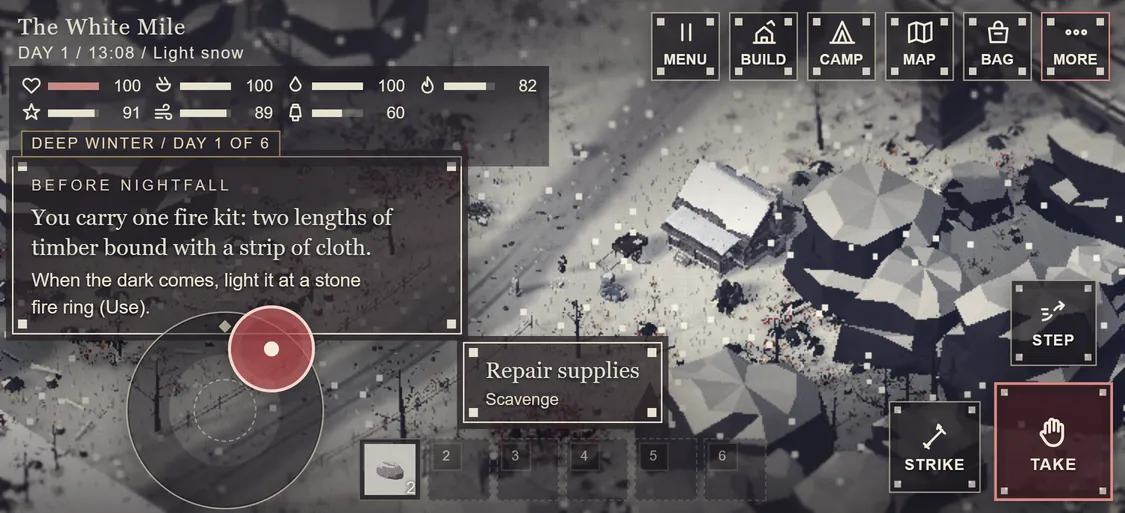
Open the road on a phone or a tablet and you now get touch controls and a layout that fits. A desktop with a mouse is unchanged.
Two thumbs
The left thumb gets a floating stick: it appears where your thumb lands. A light push crouch-walks quietly, a firm push walks, and the rim runs. The right thumb gets three plates: Use, Strike and Step. Use takes its name from what is in front of you: Take, Gather, Fell, Talk, Trade, Read, Dig.
The rest of the game, one tap away
A row of buttons opens Menu, Build, Camp, Map, Bag and More. More lists every action in the game with its key. Tap the ground to walk there, tap twice to run, press and hold for the action list, and pinch to zoom.
At the helm, too
At a landship's helm the stick drives the throttle and the turn, and the plates become Leave helm, Park or Drive, and the road autopilot.
Panels that fit
On phones every panel is a full-screen sheet with a large close button, every button is at least 44 pixels, and no panel text is smaller than 14 pixels. The first time you play on a phone or tablet, the game starts on a lighter quality setting so it runs smoothly; you can change it in the look settings.